About Guest Checkout
Guest Checkout allows you to place an online order without creating or signing in to a UNIQLO membership account. You only need to provide the information required to process your order, payment, and delivery.
Who Can Use Guest Checkout?
Guest Checkout can be used by customers both with and without a UNIQLO membership account. If you already have an account, log out first, then continue by selecting “Checkout as Guest.” Please note that purchases made through Guest Checkout will not appear in your UNIQLO account order history.
Please note that prices may differ between customers signed in to a UNIQLO membership account and customers checking out as guests.
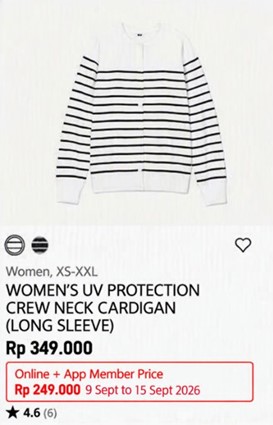
You can create an account after placing a Guest Checkout order by logging in with their Guest ID and accessing Order Details or Order History.
1. Open the guest login page from your email or UNIQLO Web/Apps and select Log In with Guest ID.
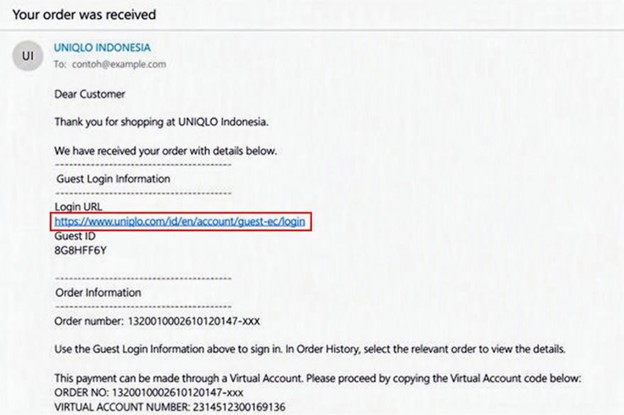
2. Enter the guest ID and the email address used when placing the order and your Guest ID, then sign in.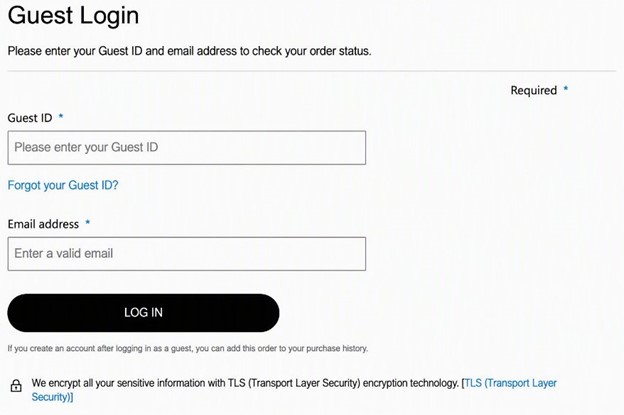
If you have your Guest ID but it is invalid after entering it on the guest account login page, the following information may help you resolve the issue:
Note: The UNIQLO account must be created while you are logged in with the Guest ID. Only the order history associated with that Guest ID will be recorded in the new account.
Who Can Use Guest Checkout?
Guest Checkout can be used by customers both with and without a UNIQLO membership account. If you already have an account, log out first, then continue by selecting “Checkout as Guest.” Please note that purchases made through Guest Checkout will not appear in your UNIQLO account order history.
How to Place an Order Using Guest Checkout
Guest Checkout Steps
1. Choose the product you would like to purchase.Please note that prices may differ between customers signed in to a UNIQLO membership account and customers checking out as guests.
2. Click “ADD TO CART” on the product page
3. Go to the cart page and click “CHECKOUT”
Please note that coupons cannot be used for orders placed through Guest Checkout.
4. Choose ”CHECKOUT AS GUEST” and then Click “AGREE”
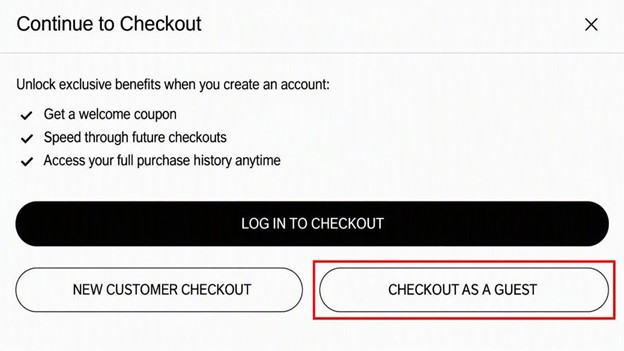
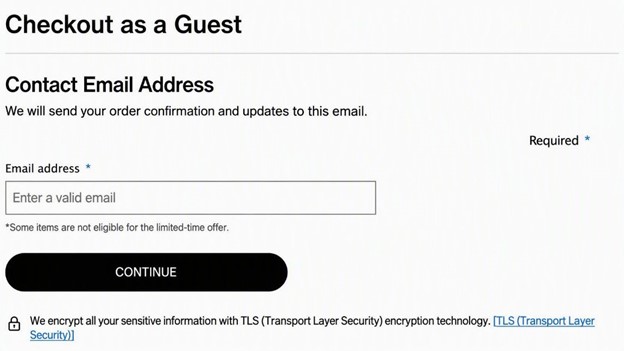
5. Enter your email address to continue to payment. Please make sure the email address is correct.
6. Choose the delivery and payment method (Order & Pick is not available for Guest Checkout)
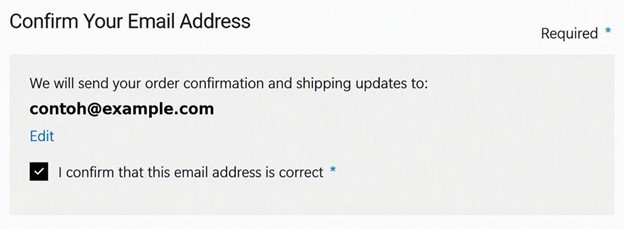
7. Confirm that your email address is correct. If the details are accurate, checklist the “CHECKBOX” to continue then click “PLACE ORDER”
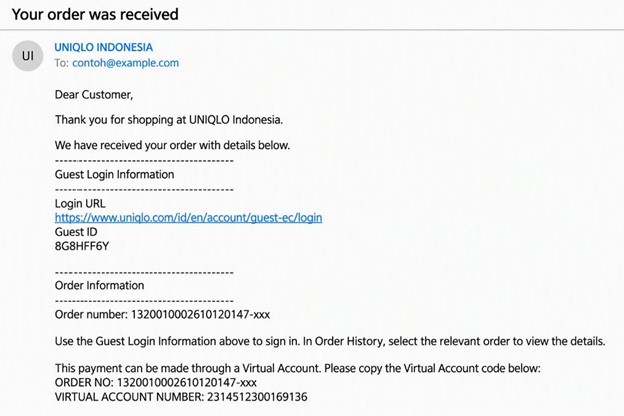
8. Once the order confirmed, you will get several emails including an email about your guest ID.
*Please be noted that the Guest ID is required to check your order status or make a return of an order placed using guest checkout. Be sure to check your spam/junk folders.
Notes:
3. Go to the cart page and click “CHECKOUT”
Please note that coupons cannot be used for orders placed through Guest Checkout.
4. Choose ”CHECKOUT AS GUEST” and then Click “AGREE”
5. Enter your email address to continue to payment. Please make sure the email address is correct.
6. Choose the delivery and payment method (Order & Pick is not available for Guest Checkout)
7. Confirm that your email address is correct. If the details are accurate, checklist the “CHECKBOX” to continue then click “PLACE ORDER”
8. Once the order confirmed, you will get several emails including an email about your guest ID.
*Please be noted that the Guest ID is required to check your order status or make a return of an order placed using guest checkout. Be sure to check your spam/junk folders.
Notes:
- Your checkout session may expire after a period of inactivity. If this happens, return to your cart and restart checkout.
- Order details cannot be changed after an order has been placed.
Shipping Option
Home Delivery
| Delivery Area | Estimated Delivery Time |
|---|---|
| JABODETABEK | Next Day |
| Java (outside JABODETABEK) | 1–6 Days |
| Bali | 2–7 Days |
| Nusa Tenggara | 2–9 Days |
| Sumatera | 2–7 Days |
| Sulawesi | 3–7 Days |
| Kalimantan | 3–7 Days |
| Maluku | 5–10 Days |
| Papua | 5–10 Days |
Click & Collect
| Store Area | Estimated Process Time |
|---|---|
| JABODETABEK | 1–2 Days |
| Java (outside JABODETABEK) | Up to 6 Days |
| Bali | Up to 6 Days |
| Nusa Tenggara | Up to 7 Days |
| Sumatera | Up to 7 Days |
| Sulawesi | Up to 7 Days |
| Kalimantan | Up to 9 Days |
- Some orders may require additional processing time depending on the items purchased.
- Your estimated delivery date will be displayed during checkout after selecting a delivery method.
Benefits of Creating an Account
Creating a UNIQLO account unlocks additional features and services that are not available through Guest Checkout.You can create an account after placing a Guest Checkout order by logging in with their Guest ID and accessing Order Details or Order History.
| Features & Services | Guest Checkout | Registered Account |
|---|---|---|
| Payment Methods | Debit/Credit Card, VA/Bank Transfer, Pay in Store, QRIS, Go Pay | All payment methods |
| Pre-Order Purchases | ✓ | ✓ |
| ORDER & PICK | ✕ | ✓ |
| Order History Access | Varies by region | 15 Months |
| Coupons | ✕ | ✓ |
| Favorites List | ✕ | ✓ |
| Back-in-Stock Notifications | ✕ | ✓ |
| Product Reviews | ✕ | ✓ |
| Product Tracking & App Notifications | ✕ | ✓ |
| Returns & Exchanges | ✓ | ✓ |
View Order History
You can view your Guest Checkout order history by following the steps below:1. Open the guest login page from your email or UNIQLO Web/Apps and select Log In with Guest ID.
2. Enter the guest ID and the email address used when placing the order and your Guest ID, then sign in.
- Your Guest ID can be found in your order confirmation email.
- If you placed multiple Guest Checkout orders, a separate Guest ID may have been generated for each order.
- If you cannot locate your Guest ID, use the “forgot your guest ID” button.
My Guest ID is invalid. How do I make the return?
If you have your Guest ID but it is invalid after entering it on the guest account login page, the following information may help you resolve the issue:
- Each order receives a different Guest ID, even when the same email address is used. Make sure the Guest ID and email address entered correspond to the same order.
- This will happen if you are logged in to a UNIQLO account on the same device that you are trying to use the Guest ID. If you are logged in, please make sure to log out of the UNIQLO account and try submitting your Guest ID again.
- If you create a UNIQLO account while logged in with a Guest ID, the order history associated with that Guest ID will be recorded in the new account. Orders associated with other Guest IDs will remain separate.
FAQ
Q: I did not receive my order confirmation email. Did my order go through?
A: First, check your spam or junk folder. The order confirmation email is sent to the email address entered when the order was placed. If you still cannot find it, contact UNIQLO Customer Support to confirm the order status.Q: I don't know my Guest ID. What should I do?
A: Your Guest ID can be found in the order confirmation email sent after your order was placed. Check your inbox and spam or junk folder for the email. If you cannot locate your Guest ID, use Forgot your Guest ID? button and follow the on-screen instructions.Q: I'm unable to access my order using my Guest ID. What should I do?
A: Confirm that the Guest ID has been entered correctly and that you are using the details associated with the Guest Checkout order. Make sure you are logged out of every UNIQLO account on your device before opening the guest order history. If access is still unavailable, contact UNIQLO Customer Support.Q: I cannot log in with my Guest ID.
A: Please verify the following information before attempting to log in again:- Confirm that your email address has been entered correctly.
- Ensure there are no spaces before or after the email address.
- If you copied and pasted your email address, confirm that no extra spaces were added.
- If you have placed multiple Guest Checkout orders, each order may have a different Guest ID.
- Verify you are using the Guest ID associated with the order you are trying to access.
Q: I logged in, but my order is not showing in Order History.
A: You may be logged in using a different Guest ID than the one associated with the order.- Check your order confirmation email to verify the Guest ID used for that order.
- Log out and sign in again using the correct Guest ID.
- Guest Checkout orders can be viewed for up to 7 months from the order date.
Q: Can I change or cancel my order?
A: Once an order has been placed, the order details cannot be canceled or modified. Order details include:- Items ordered
- Delivery method
- Shipping address
- Payment method
Q: Can I create a UNIQLO account after placing a Guest Checkout order?
A: Yes. Log in with the Guest ID used for the order, then create a UNIQLO account from Order Details or Order History. Because the account is created while you are logged in with that Guest ID, the order history associated with it will be recorded in the new account. Orders associated with other Guest IDs will remain separate. After logging in with your Guest ID, you can create a UNIQLO account from either:- Order Details
- Order History
Note: The UNIQLO account must be created while you are logged in with the Guest ID. Only the order history associated with that Guest ID will be recorded in the new account.
Q: I forgot my Guest ID. How can I retrieve it?
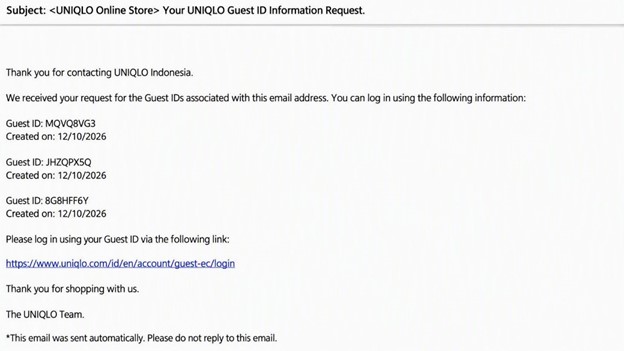
A: Select “Forgot your Guest ID?” and enter the email address used for Guest Checkout. An email containing all Guest IDs previously associated with that email address will be sent with the subject “Request for Your UNIQLO Guest ID Information”Q: Can I use Guest Checkout if I already have a UNIQLO account?
A: Yes. You can still use Guest Checkout, but the order will not appear in your UNIQLO account order historyQ: Will I receive the same Guest ID when using the same email address?
A: No. A different Guest ID is issued each time you place an order through Guest Checkout, even when you use the same email address.Need Additional Help?
If you are unable to locate your order, recover your Guest ID, complete a return, or resolve a Guest Checkout issue, please contact Customer Support for further assistance.
If you are unable to locate your order, recover your Guest ID, complete a return, or resolve a Guest Checkout issue, please contact Customer Support for further assistance.
Contact UNIQLO Indonesia
 CHAT SUPPORT
*Click "CHAT SUPPORT" button to open a window on the page to start chatting with our ChatBot
*Please note that IQ Chatbot Support cannot recognize specific information such as order numbers, delivery status, personal information, and product names
*In the case our IQ Chatbot Support is unable to answer your inquiry, our Customer Support members will assist you further.
IQ Chat Support Operating Hours: 9 am - 6 pm(Including weekends and Public Holidays)
*Please note that IQ Chatbot Support cannot recognize specific information such as order numbers, delivery status, personal information, and product names
*In the case our IQ Chatbot Support is unable to answer your inquiry, our Customer Support members will assist you further.
IQ Chat Support Operating Hours: 9 am - 6 pm(Including weekends and Public Holidays)
Email
*One of our friendly customer support agents will get back to you via email within 1 business day.
*For anything time critical please call us via our customer support phone line.
*For anything time critical please call us via our customer support phone line.
Toll Free Phone Number
Toll Free Phone Number:
(0) 8001401963
Customer Support Operating hours:
Monday - Sunday: 9am - 6pm
(Including Public Holidays)
(0) 8001401963
Customer Support Operating hours:
Monday - Sunday: 9am - 6pm
(Including Public Holidays)
Toll Free Phone Number
0-800-14-01963
0-800-14-01963
Customer Support Operating hours:
Monday - Sunday: 9am - 6pm
(Including Public Holidays)
Monday - Sunday: 9am - 6pm
(Including Public Holidays)